Automation for Call Centers
From manual call logging to fully automated workflows. Save time, reduce errors and improve customer satisfaction.
What is workflow automation for call centers?
Workflow automation for call centers refers to the use of software to handle repetitive operational tasks without manual intervention. This includes automatic call logging, real-time CRM data retrieval, post-call summary generation, follow-up task creation, and performance reporting. Instead of agents spending time on data entry and administrative work, these processes run in the background, allowing staff to focus on the conversation itself.
Call centers that implement workflow automation typically reduce after-call work by 60-75%, cutting average handling time by 30-45 seconds per call. Using tools like n8n for workflow orchestration and AI agents for call summarization, these gains are achievable within weeks rather than months. The Vynexo Automation Framework maps your existing call flows and identifies the highest-impact automation opportunities first, so you see measurable results from day one.
Incoming leads automation
Call summary automation
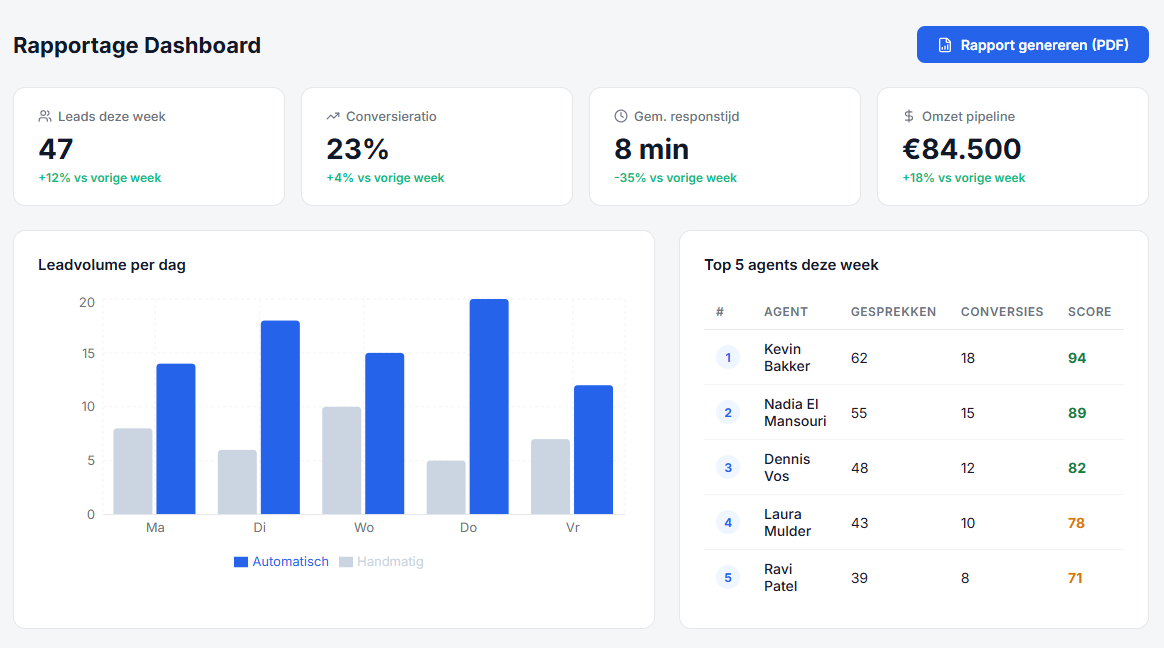
Reporting dashboard
Why do call centers choose automation?
Reduced after-call work
Automatic call logging and summary generation cut after-call work by up to 70%. Agents move to the next call faster, increasing daily call capacity by 15-20%.
Consistent data quality
Automated data capture eliminates human error in call records. CRM data accuracy improves to above 98%, leading to better reporting and customer insights.
Faster follow-up execution
Follow-up tasks, emails, and escalations are triggered automatically within seconds of call completion. Average follow-up time drops from 24 hours to under 5 minutes.
How it works
Step by step through the automation process.
Incoming call registered
Every incoming call is automatically logged in your system. Customer details, timestamp and call duration are recorded without manual input.
Customer data automatically enriched
The system instantly links the caller to existing CRM data. Previous interactions, open tickets and customer preferences appear automatically on screen.
Call summary generated
After each call, a summary is automatically created with key points, action items and next steps.
Follow-up workflow activated
Based on the call, tasks are automatically created, emails sent or follow-up appointments scheduled. Nothing is forgotten.
Reporting and insights
Daily and weekly reports are automatically generated. Insights into call volumes, wait times and customer satisfaction — without manual work.
The difference
Before automation
- Manually logging calls in spreadsheets
- Looking up customer data during calls
- Follow-ups forgotten or executed too late
- Reports cost hours per week
- Inconsistent call registration
After automation with Vynexo
- Automatic call registration and CRM integration
- Instant customer context on screen
- Automated follow-up workflows
- Real-time reports and dashboards
- Consistent, reliable data
Frequently asked questions
- How long does it take to automate call logging and CRM integration?
- Most call centers are fully operational with automated call logging and CRM integration within 2-3 weeks. The Vynexo Automation Framework includes a pre-built connector library for major CRM platforms like Salesforce, HubSpot, and Zoho, which significantly reduces setup time.
- Will automation replace our call center agents?
- No. Automation handles the repetitive administrative tasks surrounding calls, not the calls themselves. Agents typically gain 45-60 minutes per shift that was previously spent on data entry, allowing them to handle 15-20% more calls or spend more time on complex customer issues.
- Can we connect our existing phone system to automated workflows?
- Yes. Using n8n as the workflow engine, we can connect to virtually any VoIP or cloud telephony system through APIs and webhooks. This includes platforms like Twilio, Aircall, RingCentral, and most on-premise PBX systems with SIP integration.
Ready to automate your workflows?
Get in touch and discover which business processes you can automate.
Start a conversation